How do you compare two PDF files without uploading them?
Compare PDF vs PDF in your browser with AlineaDoc: files stay in the tab, and files are not uploaded to a third-party server.
Ready to try it? Open the in-browser document comparator (/app). You can start without an account. Files are not uploaded to a third-party server.
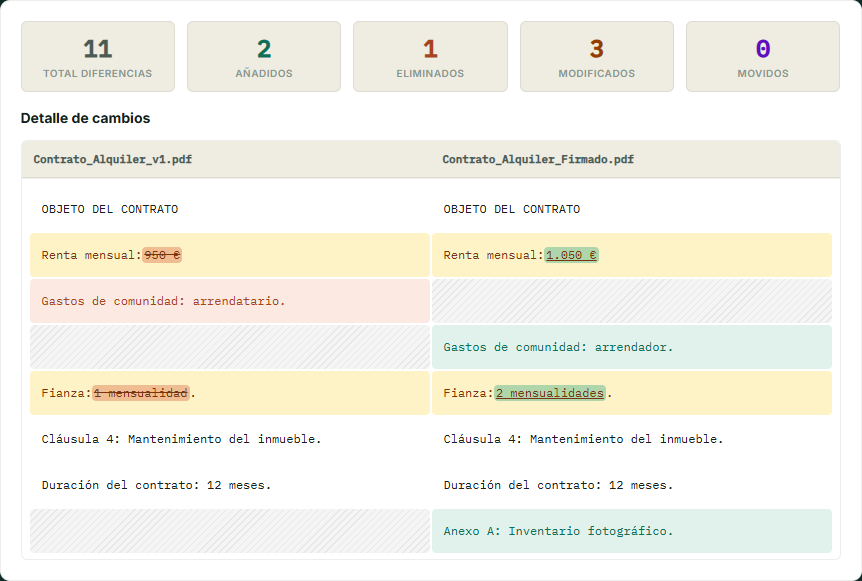
What “compare PDF vs PDF” means here
AlineaDoc extracts real text from each PDF and aligns added, removed, modified, and moved paragraphs. That is the right tool when both files were exported from Word, a contract platform, or another generator that embeds text.
It is a free in-browser utility for the review step: you decide whether the “final” PDF matches the one you already approved. No credit card required to run the diff.
How to compare two PDFs locally
Open the in-browser comparator. You do not create an account first.
- Drop the original PDF on the left and the revised PDF on the right.
- Wait for local processing; the Network panel should not show document payloads.
- Inspect modified amounts and dates first, then deletions and moved clauses.
Related private workflows
Mixing formats? Use compare PDF vs DOCX. Contracts under NDA belong on secure contract comparison. Scanned image-PDFs are covered on scanned PDF vs PDF.
Frequently asked questions
Are my PDFs uploaded when I compare them?
No. AlineaDoc parses both PDFs with local the browser in your tab. Files are not uploaded to a third-party server. Open DevTools Network during the diff: you will not see document payloads leave the browser.
Do I need an account to compare PDF vs PDF?
No. The core comparison is a free in-browser utility. You can drop two PDFs on /app without registering. Optional sign-in only expands quotas; it is not a hard paywall on the local diff.
Does this work if the PDF is only a scan?
Not directly. A scanned PDF is an image without a text layer, so a local text diff cannot run. Use a digital export when possible, or OCR first, then compare the searchable PDF in the browser.